You love pinning, right...?
You love pinning, I love pinning, I have pinned hundreds of folders. I've been wondering how folder pinning works and where it's stored.
When you right-click and choose "Pin to Quick Access", a shell verb called "pintohomefile" is invoked through IContextMenu. This is registered in the Registry:
Windows Registry Editor Version 5.00

[HKEY_CLASSES_ROOT\*\shell\pintohomefile]
"CommandStateHandler"="{b455f46e-e4af-4035-b0a4-cf18d2f6f28e}"
"CommandStateSync"=""
"MUIVerb"="@shell32.dll,-51608"
"NeverDefault"=""
"SkipCloudDownload"=dword:00000000

[HKEY_CLASSES_ROOT\*\shell\pintohomefile\command]
"DelegateExecute"="{b455f46e-e4af-4035-b0a4-cf18d2f6f28e}"
The command implements IExecuteCommand, so it's registered on DelegateExecute.
TL;DR
Here's the brief summary of this post.
What interfaces does it implement?
Now that we know its CLSID, let's find the IIDs it implements via OleView.NET.
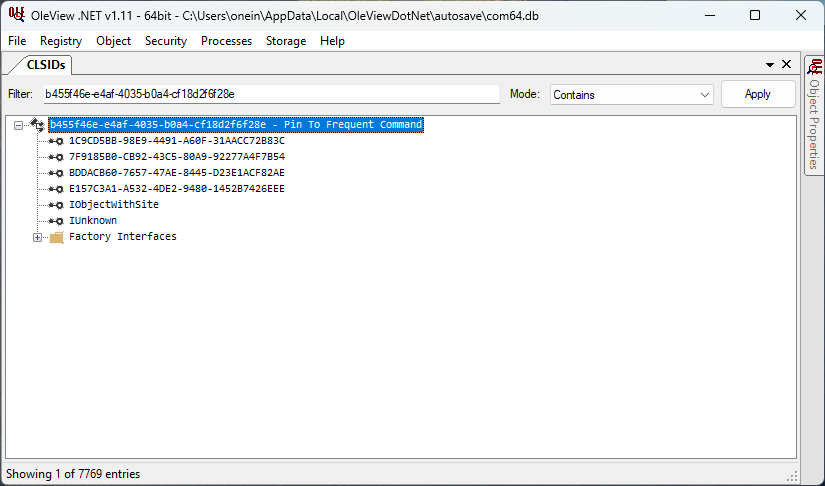
The COM class implements these interfaces and is a normal IExecuteCommand-based command. Based on the CLSID, the coclass is likely named PinToFrequent. I searched for it in IDA Pro's Names tab.

It's there! The C++ implementation likely looks like this:
class CPinToFrequentPlacesExecute
    : public IObjectWithSelection           // 1C9CD5BB-98E9-4491-A60F-31AACC72B83C
    , public IExecuteCommand                // 7F9185B0-CB92-43C5-80A9-92277A4F7B54
    , public IExplorerCommandState          // BDDACB60-7657-47AE-8445-D23E1ACF82AE
    , public IObjectWithAssociationElement  // E157C3A1-A532-4DE2-9480-1452B7426EEE
    , public IObjectWithSite                // FC4801A3-2BA9-11CF-A229-00AA003D7352
    , public IUnknown                       // 00000000-0000-0000-C000-000000000046
{
    // ...
}
Statically analyze the Execute method with IDA
Now, let's dive into the disassembly and pseudocode of IExecuteCommand::Execute in IDA Pro.
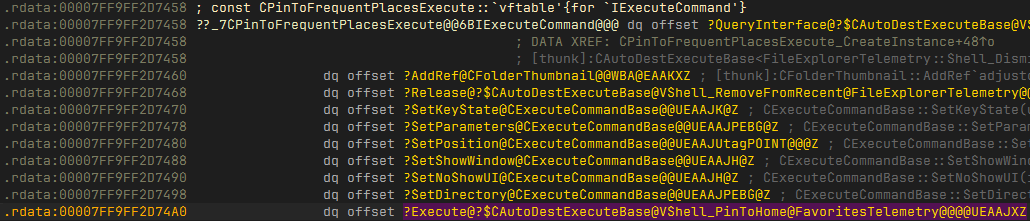
When you double-click on it, it is actually a method of its base class (probably to share the implementation among similar commands).
HRESULT __fastcall CAutoDestExecuteBase<FavoritesTelemetry::Shell_PinToHome>::Execute(
    struct CAutoDestExecuteBase *this)
Let's look at the pseudocode. The method calls GetInitializedDestinationList with different first parameters (0 and 1). 0 queries the automatic destinations file for Microsoft.Windows.Explorer, while 1 queries Microsoft.Windows.Explorer_RecentFiles. I renamed the local variables in the second parameter for clarity.
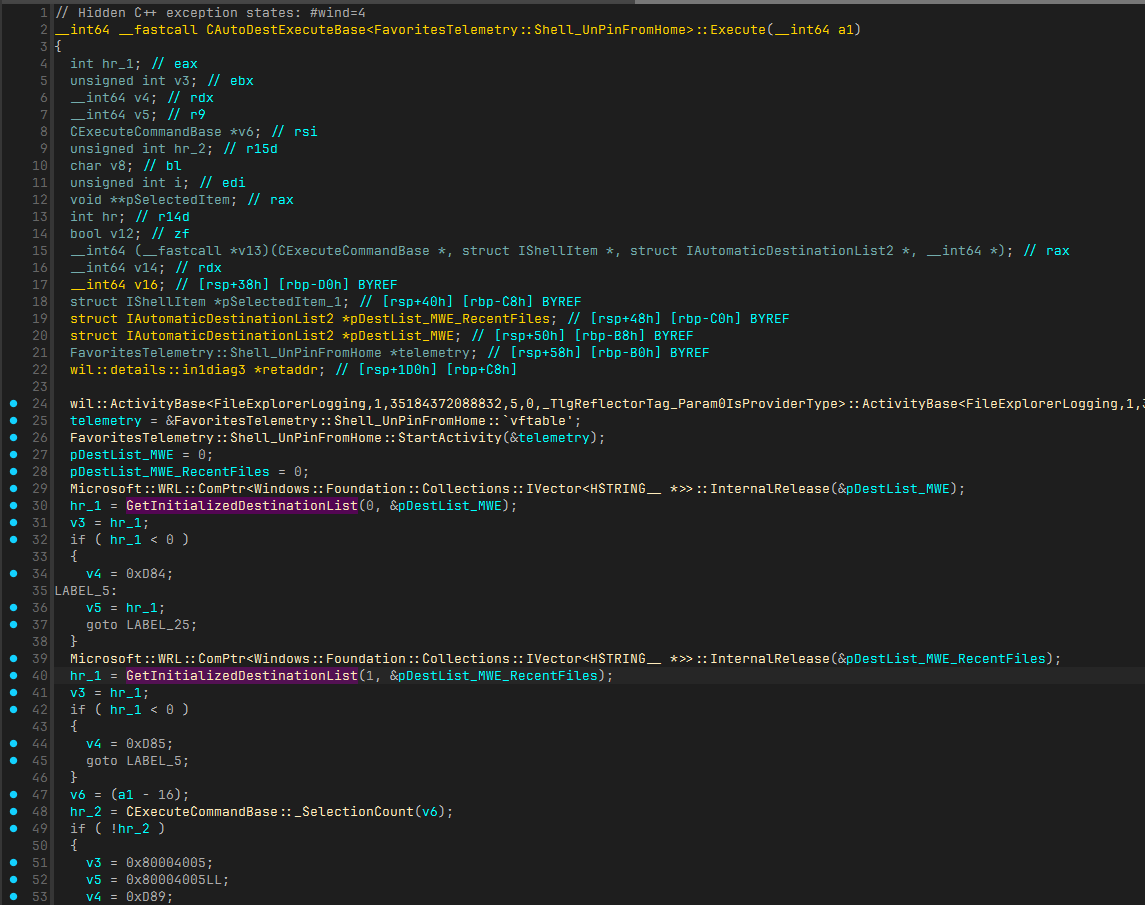
Then, _SelectionCount, _GetSelectedItem, and IShellItem_IsFolder are called. After _GetSelectedItem, the item is processed somewhere.
It also seems that they are later used for v13. What is v13, though? It's apparently a virtual function call, but since statically analyzing v13 and v6 with IDA is tedious, let's debug at runtime.
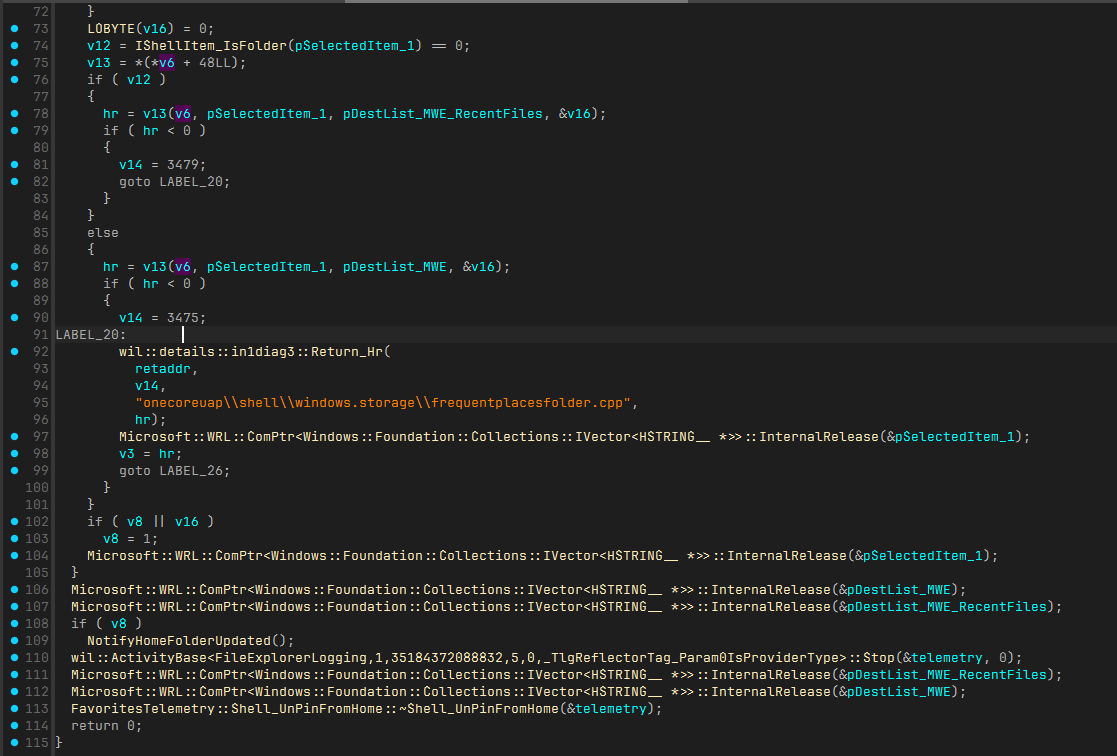
Here's the essential implementation (telemetry logging omitted):
HRESULT hr;

hr = GetInitializedDestinationList(1, &pDestList_MWE);
if (FAILED(hr)) return hr;

hr = GetInitializedDestinationList(1, &pDestList_MWE_RecentFiles);
if (FAILED(hr)) return hr;

hr = _SelectionCount(...);
if (FAILED(hr)) return hr;

for (int i = 0; i < count; i++)
{
    IShellItem* psi;
    hr = _GetSelectedItem(i, IID_PPV_ARGS(&psi));
    if (FAILED(hr)) return hr;

    auto isFiles = IShellItem_IsFolder(psi);
    if (isFiles)
    {
        hr = v13(psi, pDestList_MWE_RecentFiles, &v16);
        if (FAILED(hr)) return hr;
    }
    else
    {
        hr = v13(psi, pDestList_MWE, &v16);
        if (FAILED(hr)) return hr;
    }
}
Debug the Execute method with WinDbg
I mainly use C#, so I wrote code to invoke the command using CsWin32 for native interop.
static void PinFolderToQuickAccess()
{
    HRESULT hr = default;

    hr = PInvoke.SHCreateItemFromParsingName("C:\\Users\\me\\Desktop", null, typeof(IShellItem).GUID, out var shellItemObj);
    if (hr.Failed) return;

    hr = PInvoke.SHCreateShellItemArrayFromShellItem((IShellItem)shellItemObj, typeof(IShellItemArray).GUID, out var shellItemArrayObj);
    if (hr.Failed) return;

    // Activate the command instance
    hr = PInvoke.CoCreateInstance(CLSID_PinToFrequentExecute, null, CLSCTX.CLSCTX_INPROC_SERVER, out IExecuteCommand executeCommand);
    if (hr.Failed) return;

    // Set the target item
    hr = ((IObjectWithSelection)executeCommand).SetSelection((IShellItemArray)shellItemArrayObj);
    if (hr.Failed) return;

    // Execute the command
    hr = executeCommand.Execute();
    if (hr.Failed) return;
}
Let's launch the executable with WinDbg and make it break when windows.storage.dll is loaded.
0:000> bu windows_storage
...
0:000> x windows_storage!*PinTo*::Execute*
...
00007ffe`50bd2720 windows_storage!CAutoDestExecuteBase<FavoritesTelemetry::Shell_PinToHome>::Execute (public: virtual long __cdecl CAutoDestExecuteBase<class FavoritesTelemetry::Shell_PinToHome>::Execute(void))
We found the complete signature and load address. Let's set a breakpoint here and continue.
0:000> bp 00007ffe`50bd2720
...
0:000> g
...
Looking back at the pseudocode in IDA, the v13 was initialized like below:
v12 = IShellItem_IsFolder(v17) == 0;
v13 = *(*v6 + 48LL);
Set a breakpoint to step into IShellItem_IsFolder, then step over each instruction to identify v13.
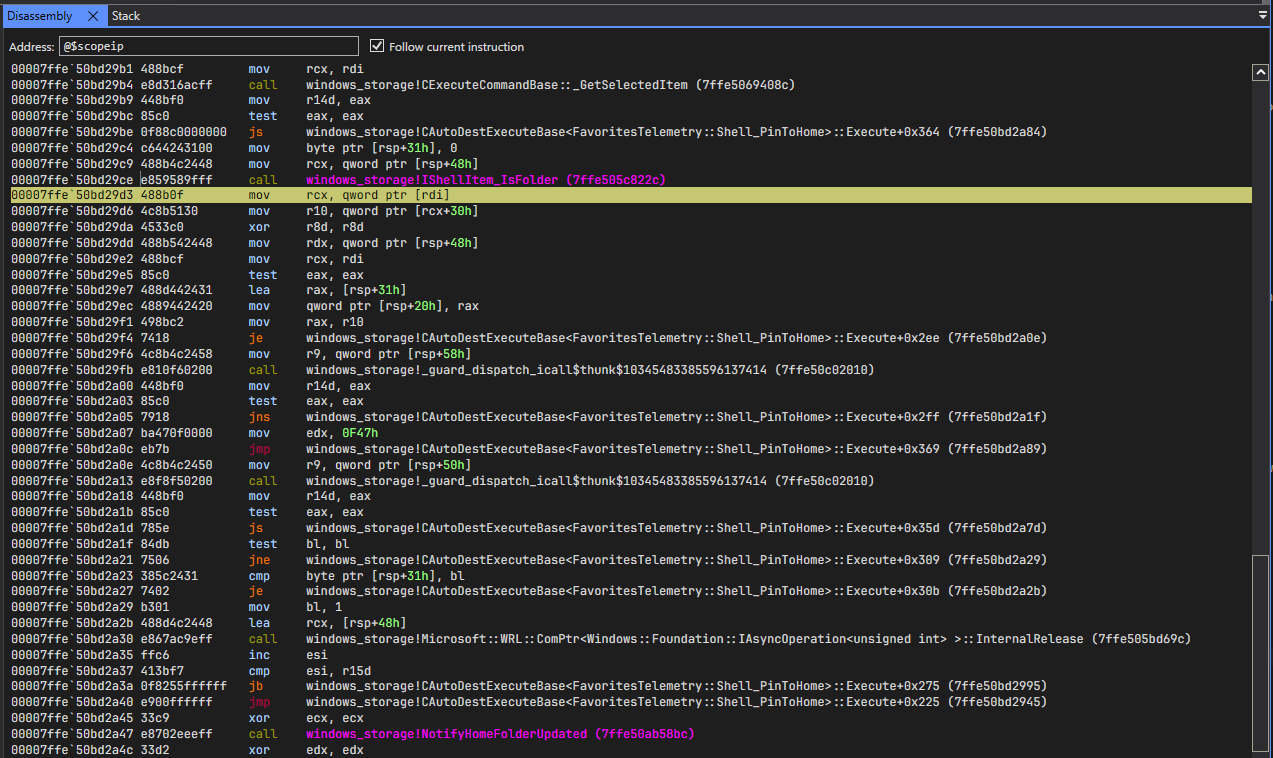
Step over each instruction:
0:000> bp windows_storage!IShellItem_IsFolder
...
0:000> g
Breakpoint 0 hit
windows_storage!IShellItem_IsFolder:
00007ffe`505c822c 4053            push    rbx
0:000> gu
windows_storage!CAutoDestExecuteBase<FavoritesTelemetry::Shell_PinToHome>::Execute+0x2b3:
00007ffe`50bd29d3 488b0f          mov     rcx,qword ptr [rdi] ds:00000174`00699d20={windows_storage!CPinToFrequentPlacesExecute::`vftable' (00007ffe`50c30d60)}
0:000> p
windows_storage!CAutoDestExecuteBase<FavoritesTelemetry::Shell_PinToHome>::Execute+0x2b6:
00007ffe`50bd29d6 4c8b5130        mov     r10,qword ptr [rcx+30h] ds:00007ffe`50c30d90={windows_storage!CPinToFrequentPlacesExecute::ProcessItem (00007ffe`50bd8ee0)}
As you can see, v6 is the vftable of CPinToFrequentPlacesExecute, and v13 is CPinToFrequentPlacesExecute::ProcessItem.
Statically analyze the ProcessItem method with IDA
Scrolling through the method reveals ExecutePinOp, which performs the actual pin operation. The simplified ExecutePinOp implementation:
HRESULT hr;

if (IShellItem_IsFolder(psi))
{
    return PinLocally();
}
else if (IsOneDriveFile(psi))
{
    if (SUCCEEDED(PinLocally()) &&
        SUCCEEDED(GetOneDriveUrl()))
    {
        return PinGraphFile();
    }
}
else
{
    return TryGetOnlineFileUrl(psi)
        ? PinGraphFile();
        : PinLocally();
}
The implementation varies by item type. Let's dive into PinLocally.
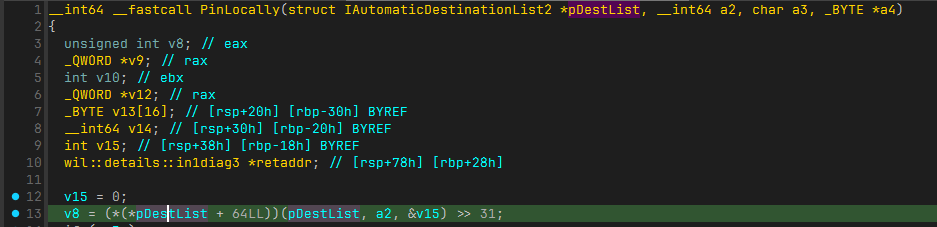
The static disassembly shows these instructions:
mov     rax, [rcx]
lea     r8, [rbp+var_18]
mov     rax, [rax+40h]
call    _guard_dispatch_icall$thunk$10345483385596137414
shr     eax, 1Fh
Let's see this in WinDbg and set a break point at the first instruction.
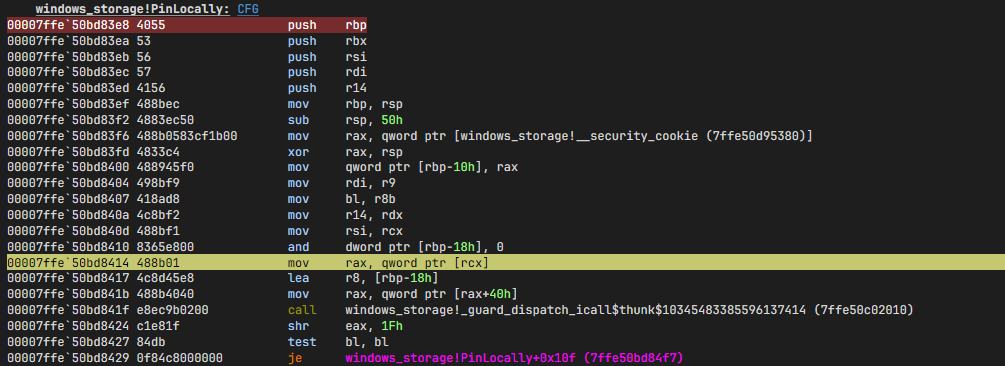
Then step over each instruction:
0:000> g
Breakpoint 4 hit
windows_storage!PinLocally+0x2c:
00007ffe`50bd8414 488b01          mov     rax,qword ptr [rcx] ds:000001db`8059dc90={windows_storage!CAutomaticDestinationList::`vftable' (00007ffe`50c29288)}
0:000> p
windows_storage!PinLocally+0x2f:
00007ffe`50bd8417 4c8d45e8        lea     r8,[rbp-18h]
0:000> p
windows_storage!PinLocally+0x33:
00007ffe`50bd841b 488b4040        mov     rax,qword ptr [rax+40h] ds:00007ffe`50c292c8={windows_storage!CAutomaticDestinationList::IsPinned (00007ffe`50ac5fa0)}
This is the IsPinned method of CAutomaticDestinationList. PinLocally first checks if the item is pinned, then pins it. Let's find that too.
The first parameter is also used in two other places.
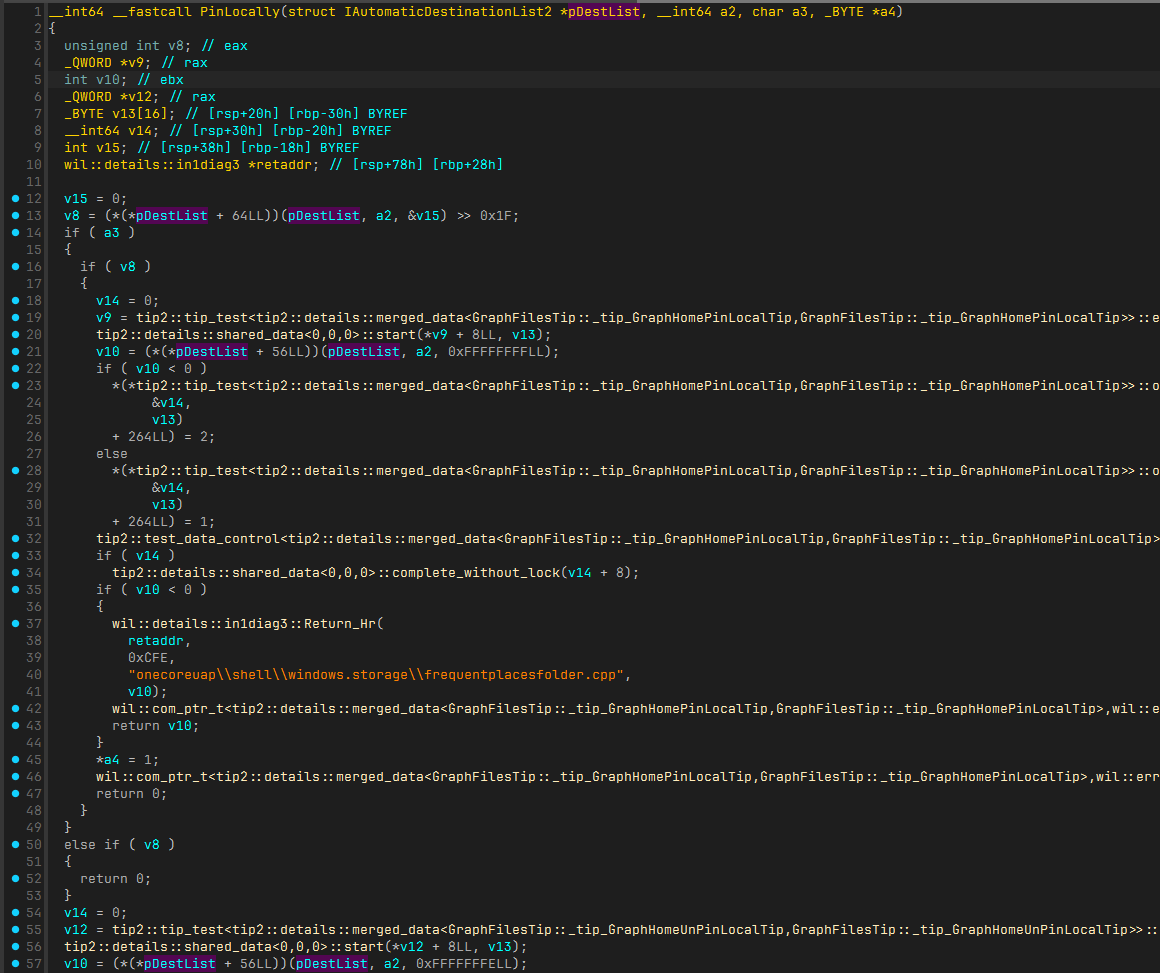
Set breakpoints at both locations. Tada! Hit! It's the PinItem method of CAutomaticDestinationList.
0:000> g
Breakpoint 0 hit
windows_storage!PinLocally+0x6d:
00007ffe`50bd8455 488b06          mov     rax,qword ptr [rsi] ds:0000018a`005bb3b0={windows_storage!CAutomaticDestinationList::`vftable' (00007ffe`50c29288)}
0:000> p
0:000> p
0:000> p
0:000> p
windows_storage!PinLocally+0x7a:
00007ffe`50bd8462 488b4038        mov     rax,qword ptr [rax+38h] ds:00007ffe`50c292c0={windows_storage!CAutomaticDestinationList::PinItem (00007ffe`50ac66a0)}
For local items, pinning adds them to Explorer's jump list.
Conclusion
We learned how pinning works. Not too hard this time, but the shell implementation is a mess...
The unpin operation is similar—just set a breakpoint at ExecuteHideOp (the activation frame matches the pin operation).
See you later!