What parses Explorer's address bar?
I wondered how Explorer parses the user's path input from its address bar.
It is easy to think of the address bar as a normal path textbox, but Explorer accepts much more than file-system paths. C:\Windows, shell:Downloads, relative paths, known shell folders, and namespace locations all have to end up as something Explorer can navigate to.
Explorer's navigation layer does not really want a string. It wants a shell namespace target, usually a PIDL. So the interesting question is: which component turns the typed text into a PIDL?
I took a look into ExplorerFrame.dll, because it contains a large part of Explorer's frame, address band, and breadcrumb implementation.
TL;DR
Where should we look first?
Assuming the path input/display area is called a breadcrumb or an address bar, let's search those terms in IDA Pro.
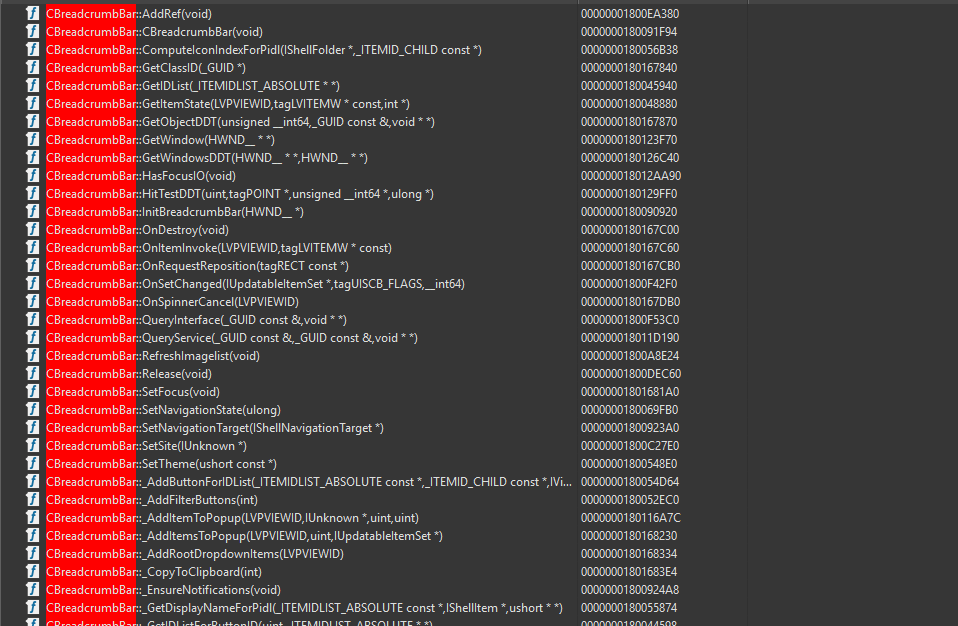
CBreadcrumbBarAnd I found these methods:
CBreadcrumbBar::_OnButtonPressNavigate
CBreadcrumbBar::_GetIDListForButtonID
CBreadcrumbBar::_NavigateToIDList
Looks like when you click one of the buttons in the breadcrumb bar, it gets the PIDL associated with that button and navigates with that PIDL. This makes sense because the target is already known.
The string parsing path starts only after the breadcrumb switches into edit mode.
CBreadcrumbBar::_GoToEditMode
CAddressBand::SetEditMode
CAddressBand::_EnsureAddressEditBox
At that point the control is no longer acting like a breadcrumb trail. It becomes an address edit box, and that is where Shell URL enters the picture.
Where is the parser?
Inside CAddressEditBox, there is a helper that ensures the parser object exists:
CAddressEditBox::_EnsureShellUrlThe interesting call is essentially this:
SHCoCreateInstance(NULL, CLSID_ShellUrl, NULL, IID_IShellUrl, &shellUrl);The GUIDs I found are:
// CLSID_ShellUrl
// {4BEC2015-BFA1-42FA-9C0C-59431BBE880E}
DEFINE_GUID(CLSID_ShellUrl,
0x4bec2015, 0xbfa1, 0x42fa, 0x9c, 0x0c, 0x59, 0x43, 0x1b, 0xbe, 0x88, 0x0e);

// IID_IShellUrl
// {4F33718D-BAE1-4F9B-96F2-D2A16E683346}
DEFINE_GUID(IID_IShellUrl,
0x4f33718d, 0xbae1, 0x4f9b, 0x96, 0xf2, 0xd2, 0xa1, 0x6e, 0x68, 0x33, 0x46);
After creating it, Explorer sets context on the object. One important bit is the current/default shell path. That matters because an address bar parser has to handle relative input too. Documents, .., or a partial folder name can mean different things depending on the current folder.
HRESULT CAddressEditBox::_EnsureShellUrl()
{
if (m_shellUrl)
return S_OK;
HRESULT hr = SHCoCreateInstance(NULL, CLSID_ShellUrl, NULL, IID_IShellUrl, &m_shellUrl);
if (FAILED(hr))
return hr;
m_shellUrl->SetOwnerWindow(m_hwnd);
// Give the parser the current Explorer location.
// This is what makes relative input meaningful.
PIDLIST_ABSOLUTE currentFolder = nullptr;
hr = _GetCurrentFolderPidl(¤tFolder);
if (SUCCEEDED(hr))
{
m_shellUrl->SetCurrentDirectoryPidl(currentFolder);
ILFree(currentFolder);
}
return S_OK;
}Where does parsing start?
When the user finishes editing, the flow goes through the address edit box:
CAddressEditBox::_OnEndEditA
CAddressEditBox::_HandleUserAction
CAddressEditBox::_StartParse
_StartParse is where IShellUrl is used as the parser. Depending on the situation, Explorer can use the synchronous Parse path or an async parse path. After parsing completes, the result is handled here:
CAddressEditBox::_HandleParseCompletion
CAddressEditBox::_NavigateAfterParse
The navigation step asks IShellUrl for the PIDL and then passes that to Explorer's navigation target:
PIDLIST_ABSOLUTE pidl;
shellUrl->GetPidl(&pidl);

navigationTarget->NavigateToPidl(pidl, ...);
That is the key design point. The address bar does not turn text into a file path and navigate by path. It turns text into a shell namespace PIDL, then Explorer navigates to the PIDL.
Inferred IShellUrl definition
This interface is not a public SDK contract. OleView.NET shows that the Shell URL COM class is implemented in shell32.dll.
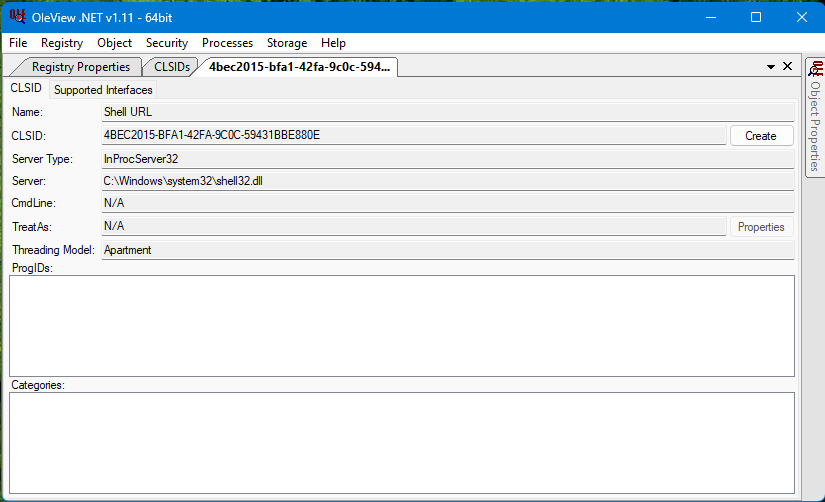
Let's find it in that DLL with IDA Pro.

CShellUrl in shell32.dllDouble-click it, and now we can see the implementation.
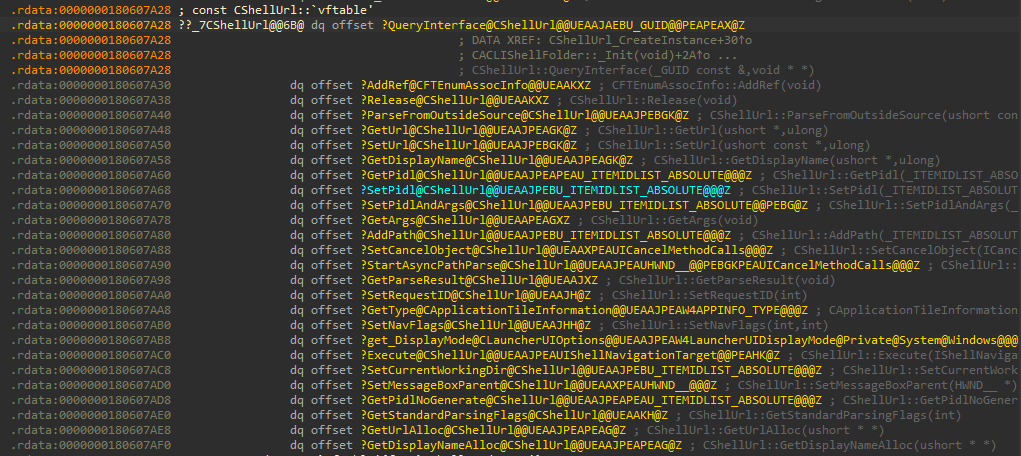
CShellUrl implementationMIDL_INTERFACE("4F33718D-BAE1-4F9B-96F2-D2A16E683346")
IShellUrl : public IUnknown
{
virtual HRESULT STDMETHODCALLTYPE ParseFromOutsideSource(PCWSTR url, DWORD flags) PURE;
virtual HRESULT STDMETHODCALLTYPE GetUrl(PWSTR buffer, DWORD cchBuffer) PURE;
virtual HRESULT STDMETHODCALLTYPE SetUrl(PCWSTR url, DWORD flags) PURE;
virtual HRESULT STDMETHODCALLTYPE GetDisplayName(PWSTR buffer, DWORD cchBuffer) PURE;
virtual HRESULT STDMETHODCALLTYPE GetPidl(PIDLIST_ABSOLUTE* ppidl) PURE;
virtual HRESULT STDMETHODCALLTYPE SetPidl(PCIDLIST_ABSOLUTE pidl) PURE;
virtual HRESULT STDMETHODCALLTYPE SetPidlAndArgs(PCIDLIST_ABSOLUTE pidl, PCWSTR args) PURE;
virtual PWSTR STDMETHODCALLTYPE GetArgs() PURE;
virtual HRESULT STDMETHODCALLTYPE AddPath(PCIDLIST_ABSOLUTE pidl) PURE;
virtual void STDMETHODCALLTYPE SetCancelObject(ICancelMethodCalls* cancel) PURE;
virtual HRESULT STDMETHODCALLTYPE StartAsyncPathParse(HWND hwnd, PCWSTR path, DWORD flags, ICancelMethodCalls* cancel) PURE;
virtual HRESULT STDMETHODCALLTYPE GetParseResult() PURE;
virtual HRESULT STDMETHODCALLTYPE SetRequestID(int requestId) PURE;
virtual HRESULT STDMETHODCALLTYPE GetType(void* out) PURE;
virtual HRESULT STDMETHODCALLTYPE SetNavFlags(int navFlags, int mask) PURE;
virtual HRESULT STDMETHODCALLTYPE get_DisplayMode(void* out) PURE;
virtual HRESULT STDMETHODCALLTYPE Execute(IShellNavigationTarget* target, int* result, DWORD flags) PURE;
virtual HRESULT STDMETHODCALLTYPE SetCurrentWorkingDir(PCIDLIST_ABSOLUTE pidl) PURE;
virtual void STDMETHODCALLTYPE SetMessageBoxParent(HWND hwnd) PURE;
virtual HRESULT STDMETHODCALLTYPE GetPidlNoGenerate(PIDLIST_ABSOLUTE* ppidl) PURE;
virtual DWORD STDMETHODCALLTYPE GetStandardParsingFlags(BOOL mode) PURE;
virtual HRESULT STDMETHODCALLTYPE GetUrlAlloc(PWSTR* ppszUrl) PURE;
virtual HRESULT STDMETHODCALLTYPE GetDisplayNameAlloc(PWSTR* ppszName) PURE;
};
class DECLSPEC_UUID("4BEC2015-BFA1-42FA-9C0C-59431BBE880E") CShellUrl;Conclusion
The breadcrumb bar itself does not parse typed address text. When Explorer enters address edit mode, CAddressEditBox creates the internal Shell URL COM object and delegates parsing to IShellUrl.
The output is not a normalized string. It is a PIDL.
That is why C:\Windows, shell:Downloads, and other shell-style inputs can all flow into the same Explorer navigation machinery.