Wait... how does this view work?
The Fonts folder is weird.
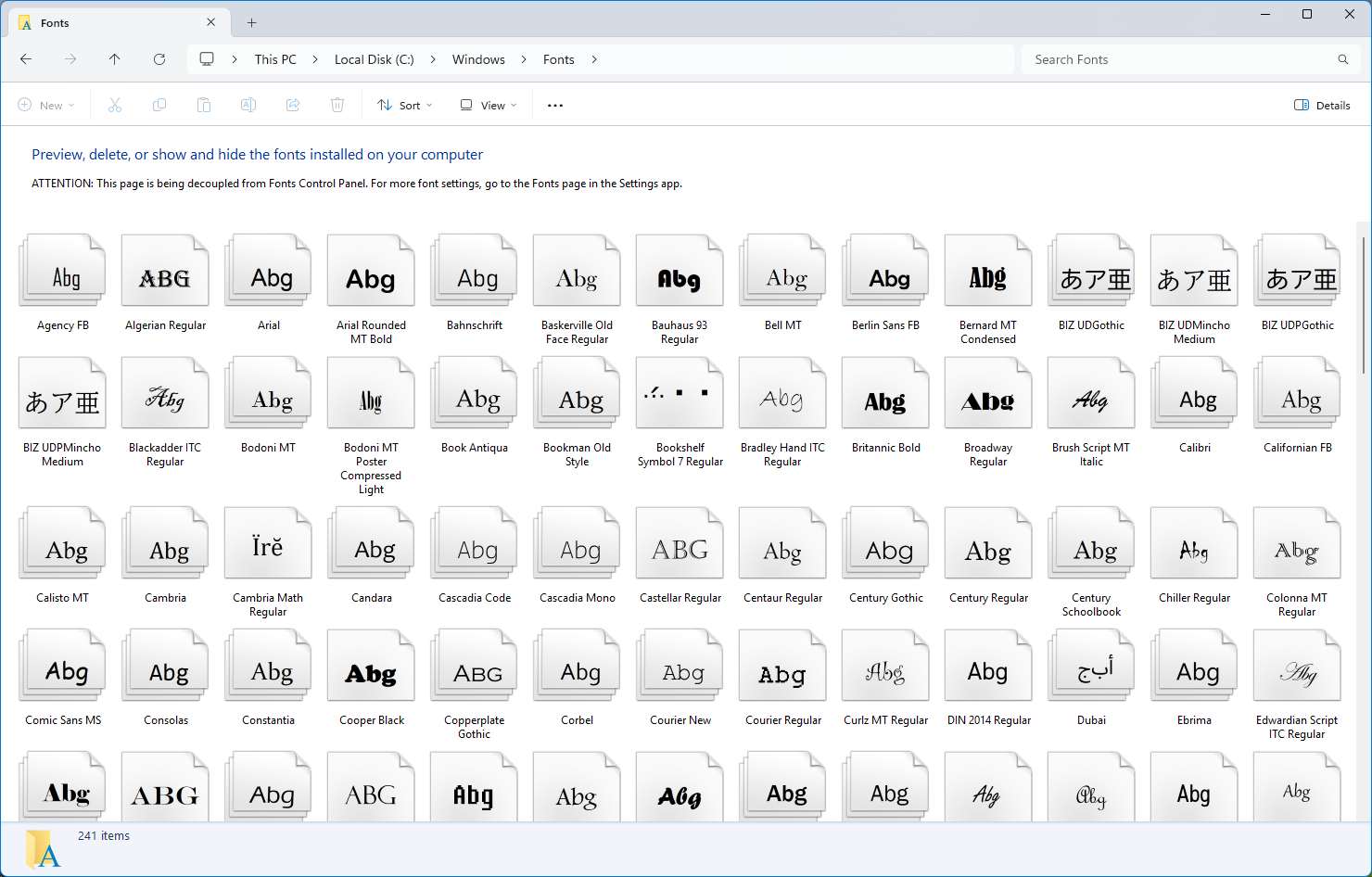
This does not look like the ordinary folder view shown for something like C:\Users.
The items are font families, not just raw .ttf / .otf files, and the thumbnails show a rendered Abg sample.
So the first question is simple:
Is Explorer special-casing C:\Windows\Fonts?
The answer is no. Explorer is not checking that path and switching to a hard-coded view. The folder opts into a Shell folder implementation through Desktop.ini.
TL;DR
The important file is:
[.ShellClassInfo]
CLSID={BD84B380-8CA2-1069-AB1D-08000948F534}
That CLSID is registered as:
HKCR\CLSID\{BD84B380-8CA2-1069-AB1D-08000948F534}
  (Default) = Microsoft Windows Font Folder

HKCR\CLSID\{BD84B380-8CA2-1069-AB1D-08000948F534}\InProcServer32
  (Default) = C:\Windows\System32\fontext.dll
  ThreadingModel = Apartment
So the unusual view is not a Control Panel view and not a path-specific Explorer hack. It is a Shell folder extension implemented by fontext.dll.
Desktop.ini can change the folder class
C:\Windows\Fonts is still a real file-system directory, but it has a Shell class override.
When Explorer navigates there, it does not have to treat the folder as a plain file-system directory. The [.ShellClassInfo] section tells the Shell to use the COM class {BD84B380-8CA2-1069-AB1D-08000948F534} for the folder.
That class is the Font Folder class in fontext.dll.
This explains the first visible difference. The folder is not showing a normal file-system projection. It is showing items produced by the font folder's Shell namespace implementation.
That is why Arial appears as one item even though the actual files behind it can be multiple files such as regular, bold, italic, and bold italic variants.
What does Explorer enumerate?
To see what the folder gives to Explorer, I wrote a small POC that binds to the Fonts folder as a Shell folder and enumerates its child PIDLs.
The interesting path is:
SHCreateItemFromParsingName(L"C:\\Windows\\Fonts", ..., IID_IShellItem, ...);
IShellItem::BindToHandler(BHID_SFObject, IID_IShellFolder, ...);
IShellFolder::EnumObjects(...);
IShellFolder::GetDisplayNameOf(childPidl, SHGDN_NORMAL, ...);
Running it:
dotnet run --file FontFolderPoc.cs -- list --limit 30On my machine this starts like:
  1. System Bold
  2. Terminal
  3. Fixedsys Regular
  4. Modern Regular
  5. Roman Regular
  ...
 17. Arial
 18. Bahnschrift
 19. Calibri
These are Shell namespace items. They are not just the raw file names in C:\Windows\Fonts.
Where do the thumbnails come from?
The thumbnail is also provided by fontext.dll.
There is another registered CLSID:
HKCR\CLSID\{B8BE1E19-B9E4-4EBB-B7F6-A8FE1B3871E0}
  (Default) = Microsoft Windows Font IExtractImage Handler

HKCR\CLSID\{B8BE1E19-B9E4-4EBB-B7F6-A8FE1B3871E0}\InProcServer32
  (Default) = C:\Windows\System32\fontext.dll
  ThreadingModel = Apartment
The interface used here is the old Shell thumbnail interface:
// {BB2E617C-0920-11D1-9A0B-00C04FC2D6C1}
interface IExtractImage : IUnknown
{
    HRESULT GetLocation(...);
    HRESULT Extract(HBITMAP* phBmpThumbnail);
};
For a Fonts folder item, the path is:
IShellFolder* fontFolder;
PCUITEMID_CHILD childPidl;

fontFolder->GetUIObjectOf(
    hwnd,
    1,
    &childPidl,
    IID_IExtractImage,
    nullptr,
    (void**)&extractImage);

extractImage->Extract(&hbitmap);
This is the path Explorer uses for the font family items shown inside the Fonts folder. The folder gives Explorer a child PIDL, and Explorer asks that item for IExtractImage.
The POC can do the same thing:
dotnet run --file FontFolderPoc.cs -- family ArialIt prints:
Path: C:\Windows\Fonts EnumObjects -> GetUIObjectOf(IID_IExtractImage)
Matched font shell item: Arial
Requested size: 256x256
Saved: D:\Source\windows-shell-pocs\Arial.png
The generated image is the same kind of Abg thumbnail that Explorer shows.
Direct file path thumbnail path
There is also a useful direct path for testing a single font file:
dotnet run --file FontFolderPoc.cs -- extract C:\Windows\Fonts\arial.ttf .\arial-file.png 256That path creates the thumbnail handler directly:
CoCreateInstance(
    CLSID_FontThumbnail,
    nullptr,
    CLSCTX_INPROC_SERVER,
    IID_IInitializeWithFile,
    ...);

IInitializeWithFile::Initialize(L"C:\\Windows\\Fonts\\arial.ttf", STGM_READ);
IExtractImage::Extract(&hbitmap);
From reversing fontext.dll, this path initializes the font from the file and renders the sample text. The sample text resource is Abg, which matches what we see in Explorer.
This direct path is not the full folder view path, though. It is useful for proving the thumbnail handler, while the folder view itself works through the Fonts folder's IShellFolder and child PIDLs.
So is it a Control Panel view?
It looks like one, but the mechanism is the Shell namespace extension mechanism.
The important pieces are:
C:\Windows\Fonts\desktop.inipoints toCLSID_FontFolderCLSID_FontFolderis implemented byfontext.dll- Explorer binds the folder to
IShellFolder - the folder enumerates font-family-like Shell items
- thumbnails come from
IExtractImage, also implemented byfontext.dll
So the Fonts folder is not a normal folder view with custom columns, and it is not just a Control Panel page embedded into Explorer.
It is a real folder on disk that asks the Shell to use a custom folder class. Once Explorer honors that class, the rest of the behavior comes from COM interfaces: IShellFolder, PIDLs, and IExtractImage.
Conclusion
The Fonts folder view is a good reminder that Explorer is not only a file manager over paths.
It is a Shell namespace browser.
For ordinary folders, the namespace maps closely to files and directories. For C:\Windows\Fonts, Desktop.ini changes the folder class to Microsoft Windows Font Folder, and fontext.dll supplies the custom enumeration and thumbnail behavior.
That is why the view can group font families and render Abg thumbnails without Explorer having a hard-coded Fonts folder UI.